Online Payment
General information
- Client - The end user of the service
- Merchant - A legal entity that has concluded a contract with ePay.bg
- The files cited in the documentation can be downloaded from the "Demo package" link under the login button at https://demo.epay.bg/
Description of the payment process
- A customer places an order in the Merchant's online store.
- After completing the order, the customer proceeds to payment by selecting the appropriate button on the merchant's website and is redirected to a payment page where he selects a specific method from the following:
- from your ePay.bg profile
- directly by debit or credit card
- at EasyPay office
- at an ATM
- Regardless of the customer's choice, the merchant sends a payment request package to ePay.bg system and forwards the customer to the payment methods page, submitting the payment request as described below.
- ePay.bg monitors the status of registered/recorded pending obligations and upon payment/rejection of payment, a notification is sent to the merchant regarding the status of the respective request. System notifications are sent to ports:
- 80 for HTTP
- 443 for HTTPS
- Upon receiving a notification from ePay.bg, the merchant must form a corresponding response. If the notification is received again, the first response returned is repeated.
Payment via an ePay.bg account
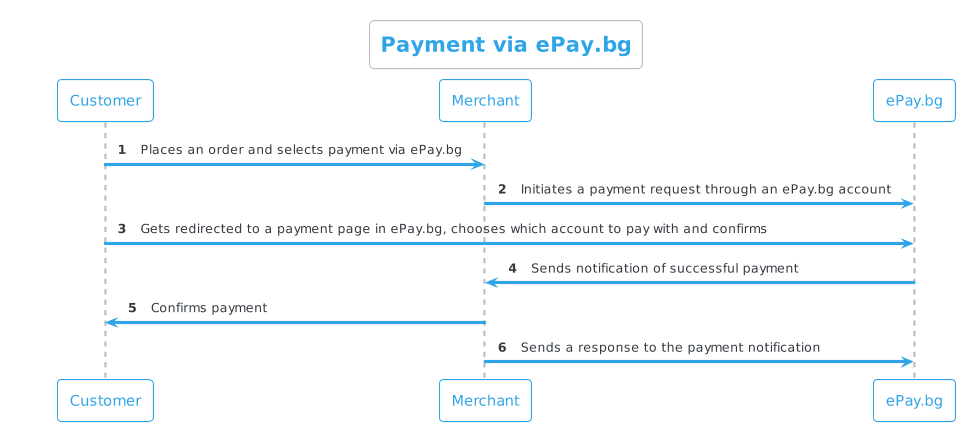
The customer makes the payment by choosing a means of payment (registered bank card or account) and confirms the payment with his password and other information if required. The customer has two options - to pay the obligation immediately or refuse it.
In case the customer does not log into the ePay.bg system or makes an unsuccessful attempt, the payment request is not recorded in the system.
Important!
For payment by registered users in ePay.bg, the request must be sent with PAGE=paylogin.
Payment by bank card
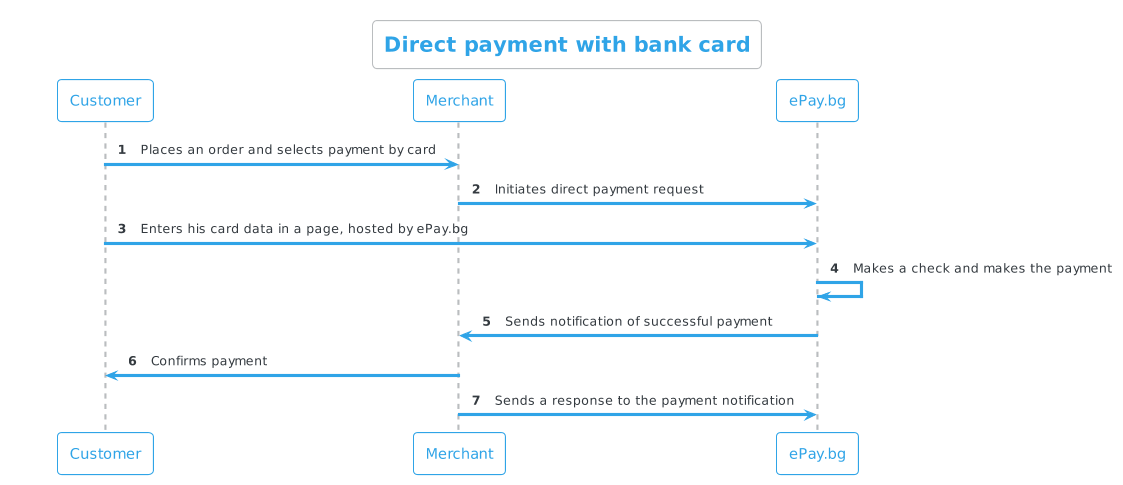
The customer makes the payment by entering information about his bank card on the page hosted by ePay.bg and confirming the payment.
Important!
For direct payment by bank cards, the request must be sent with PAGE=credit_paydirect.
Payment via EasyPay checkout
ePay.bg automatically generates a 10-digit code for each request submitted by the merchant. To pay via the EasyPay cash register or at an ATM, it is necessary to use the 10-digit payment code generated for the relevant order.
ATM payment
To pay at an ATM, the customer should visit an ATM and select from its menu:
- "Other Services" menu
- Select the "B-Pay" menu
- Enter merchant code – 60000
- Enter the 10-digit order payment code (the same code as when paying at the EasyPay checkout)
To pay at an ATM, a request for payment via EasyPay is prepared, which generates a 10-digit code.
Communication scheme
Production environment
| Method | Address | Description |
|---|---|---|
| POST | https://www.epay.bg/ | Bulgarian language version |
| POST | https://www.epay.bg/en/ | English language version |
To run the service in a production environment, you must:
- To have a contract with ePay.bg for accepting payments.
- To have a secret word (
SECRET) which is obtained with phone registration and dpass. - Use the CIN from your ePay.bg account - visible on the home page - Customer number (CIN).
- Add a notification address by sending an email to Commercial Department - merchant@epay.bg containing your CIN and notification URL.
Notification URL / secret word
The merchant can find the notification URL and secret in his https://epay.bg/ profile without being able to change them. - The change is made with a request to Commercial Department - merchant@epay.bg.
In a demo environment, the merchant himself can set a notification address.
Payment request
| Parameter | Type | Description | Optionality |
|---|---|---|---|
| PAGE | string | paylogin - for payment by registered userscredit_paydirect - for direct payment with payment cards. "ePay World" |
Mandatory |
| ENCODED | string | Base64-encoded (RFC 3548) payment request, EOL=''. |
Mandatory |
| CHECKSUM | string | Checksum on ENCODED generated as HMAC with SHA-1 algorithm and merchant's secret word. |
Mandatory |
| LANG | string | ePay.bg page language bg,en. |
Optional |
| SIGNATURE | string | Digital signature on ENCODED generated with merchant's private key (RSA, 1024/2048/4096 bits). The use of digital signature requires that the merchant has submitted a certificate in the X509 format to the system. |
Optional |
| URL_OK | string | URL to which the customer will be forwarded in case they confirm the payment (does not guarantee that the payment has been made). | Optional |
| URL_CANCEL | string | URL to which the customer will be forwarded in case he declines the payment for now (can pay or decline later, but not after the date specified by the merchant). | Optional |
Parameters in ENCODED
| Parameter | Type | Description | Optionality |
|---|---|---|---|
| MIN | int | Customer Identification Number (CIN) | Mandatory |
| string | Email of the merchant in the system | Optional | |
| INVOICE | int | Invoice Number; unique to merchant | Mandatory |
| AMOUNT | float | Valid amount > 0.01 (eg: 22, 22.8, 22.80) | Mandatory |
| CURRENCY | string | Accepted currencies are BGN, USD, or EUR; if not provided it defaults to BGN |
Optional |
| EXP_TIME | datetime | Payment end date/time; format DD.MM.YYYY[hh:mm[:ss]] |
Mandatory |
| DESCR | string | Description up to 100 characters; CP1251 characters if no other ENCODING |
Optional |
| ENCODING | encoding | Encoding of the DESCR parameter. Only utf-8 is accepted; can also be passed as an HTTP parameter |
Optional |
Sample request for payment by bank card
1 2 3 4 5 6 7 8 9 10 11 12 13 14 15 16 17 18 19 20 21 22 23 24 | |
Payment notification
To receive real-time notifications about the status of payments, you need to develop a Payment Notification.